
Product Short Description
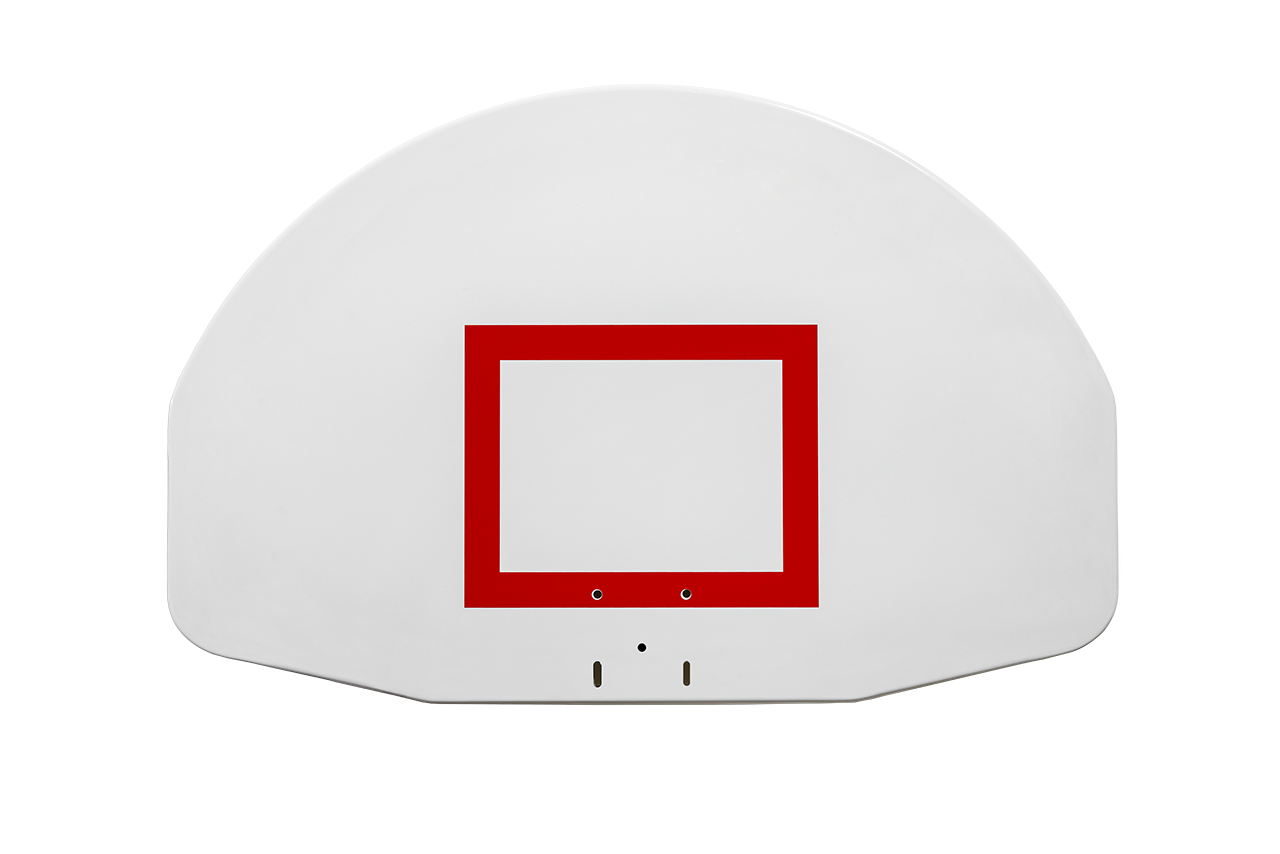
Choose the Gared 1245 blank, 1245T target-only, or 1245B target-and-border steel fan backboard. Each features a reinforced 12-gauge steel shell and white powdercoat finish. Backboard only; rim, net, support structure, and height adjuster sold separately.
IMPORTANT — SHIPPING, DELIVERY & DAMAGE CLAIMS
Please inspect your shipment for damage or missing items before signing for delivery. Photos and delivery documentation are required to file a damage or loss claim. Without this documentation, the customer will be responsible for purchasing any replacement items that are needed.
Read the complete Shipping, Delivery & Damage Claims instructions ↓
Product Description
Steel Fan Basketball Backboard for Playground Courts
The Gared steel fan basketball backboard comes in three face designs for your court. Choose a blank white board, an orange target, or an orange target with a border. Each model has a white powdercoat finish and a strong steel shell. This product includes one backboard only. Therefore, you can buy the board on its own when you need to replace an existing board.
Choose Your Backboard Design
- 1245 – Blank: A white fan-shaped board with no target or border.
- 1245T – Target Only: A white board with an orange shooting target and no border. This is the default choice.
- 1245B – Target and Border: A white board with an orange target and a stripe around the outer edge.
All three models share the same fan shape and size. However, the painted markings differ. First, choose the face design that suits your court. Then, check the price shown for that model above.
Built with a Strong Steel Shell
Gared makes these boards with 12-gauge steel. In addition, welded steel channels brace the rear of each board. The board also has two safety mount holes. All three designs have a white powdercoat finish.
Check Your Mount Before You Buy
The nominal board size is 35 by 54 inches. However, the spec drawings show an overall height of 35½ inches and a width of 54 inches. The board’s mount points sit 35 inches apart from side to side and 20 inches apart from top to bottom.
Before you buy, check your support frame and front-mount rim against the spec sheet for your chosen model. Also, review the rim and backboard chart in the Instructions tab. The same board size alone does not mean that all parts will fit.
The rim, net, support frame, and height adjuster are sold separately. For a complete system, see our stationary wall mount basketball goal. Otherwise, choose your steel fan basketball backboard above.
Additional Information
| Weight | N/A |
|---|---|
| Dimensions | N/A |
| Backboard Design | Blank – 1245, Target Only – 1245T, Target + Border – 1245B |
The Gared 1245, 1245T, and 1245B steel fan basketball backboards ship by freight truck. Each board measures approximately 35½ inches high by 54 inches wide. Gared lists a shipping weight of 81 pounds for 1245 and 1245T; the same weight is estimated for 1245B, which adds a painted border. This product includes the backboard only.
Shipping charges are calculated at checkout after you enter your delivery address. The freight calculation includes lift gate service.
Arrange a clear, accessible unloading area and have someone available to receive your shipment. If the truck arrives without the included lift gate service, contact us before unloading.
Standard freight delivery does not include moving the equipment indoors. If you need inside delivery or additional handling, contact us before shipment to discuss arrangements and any extra charges.
Inspect and photograph your shipment before and after unloading. Document any visible damage or missing items on the delivery paperwork or app before signing. Keep your photos for any damage or loss claim.
Shipping, Delivery & Damage Claims
Please inspect your shipment carefully at the time of delivery. Your shipment is insured, and damage or loss is rare. However, it can happen. In order to file an insurance claim, any damage or missing items must be documented at the time of delivery.
Before the shipment is unloaded, take clear photos from several angles. Then, after unloading, take additional photos in good lighting. These photos provide important documentation if a damage or loss claim becomes necessary.
Damage Claims
If the shipment, packaging, pallet, or any item appears damaged, dented, crushed, torn, or otherwise questionable, take plenty of photos before the shipment is unloaded from the truck. After unloading, take additional overall and close-up photos in better lighting.
Ask the driver to document all visible damage on the delivery paperwork, Bill of Lading (BOL), or electronic delivery app. The damage must be documented before you sign for and accept the delivery.
Your signature indicates that you accepted the shipment in its delivered condition. Therefore, do not sign the delivery paperwork or electronic delivery confirmation until you have inspected the shipment and documented any visible damage.
If there are no photos taken at the time of delivery and the damage is not documented on the delivery paperwork or app before you sign, an insurance damage claim cannot be filed. In that case, the customer will be responsible for purchasing any replacement items that are needed.
However, when you have delivery photos and the damage has been properly documented before accepting the shipment, a claim can be filed and the damaged item can be replaced at no cost to the customer.
Lost or Missing Item Claims
A shipment may appear to be in perfect condition while an item is still missing. Therefore, take photos of every shipment at the time of delivery, even when everything appears to be fine.
Take photos from several angles before the shipment is unloaded. After unloading, take additional photos in good lighting. These images help establish exactly what was present when the shipment arrived.
The shipper will have photographed the shipment before it was loaded for transportation. If an item is missing, those photographs can be compared with your delivery photos to document the loss and support an insurance claim.
If there are no photos taken at the time of delivery, an insurance claim cannot be filed for a lost or missing item. In that case, the customer will be responsible for purchasing any replacement items that are needed.
However, when your delivery photos show that an item was missing when the shipment arrived, the photographs can be compared with the shipper’s documentation to support the claim. Once the loss is properly documented, the missing item can be replaced at no cost to the customer.
Before You Sign for Your Shipment
- Inspect the shipment for visible damage or missing items.
- Photograph the shipment from several angles before unloading.
- Photograph it again after unloading in good lighting.
- Document any damage or loss on the delivery paperwork, BOL, or delivery app.
- Do not sign until any visible damage or loss has been documented.
- Keep your photos in case an insurance claim needs to be filed.
Taking a few photos at the time of delivery can make all the difference. Proper documentation protects you and provides the information required to file an insurance claim if your shipment arrives damaged or incomplete.


