Product Short Description
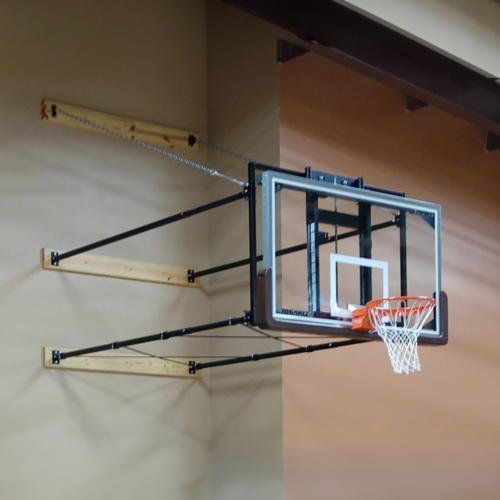
The Gared Sports Height Adjuster for Ceiling Mount Basketball Hoop turns a stationary hoop into a height adjustable system. The kit includes a height adjuster (manual or electric), U bolt brackets to connect to a 6-5/8” diameter backstop, and brackets to connect a 72” x 42” competition backboard.
IMPORTANT — SHIPPING, DELIVERY & DAMAGE CLAIMS
Please inspect your shipment for damage or missing items before signing for delivery. Photos and delivery documentation are required to file a damage or loss claim. Without this documentation, the customer will be responsible for purchasing any replacement items that are needed.
Read the complete Shipping, Delivery & Damage Claims instructions ↓
Product Description
Height Adjuster for Ceiling Mount Basketball Hoop
The Gared Sports Height Adjuster for Ceiling Mount Basketball Hoop turns a stationary hoop into a height adjustable system. The kit includes a height adjuster (manual or electric), U bolt brackets to connect to a 6-5/8” diameter backstop, and brackets to connect a 72” x 42” competition backboard.
The Gared Sports Height Adjuster for Ceiling Mount Basketball Hoop fits most modern single post ceiling mount basketball goals. This system is not designed for ladder frame ceiling mount goals. Please review the information below and double check the dimensions of your basketball hoop before ordering. If you have any questions, please contact us to speak to an experienced installer.
Height Adjuster
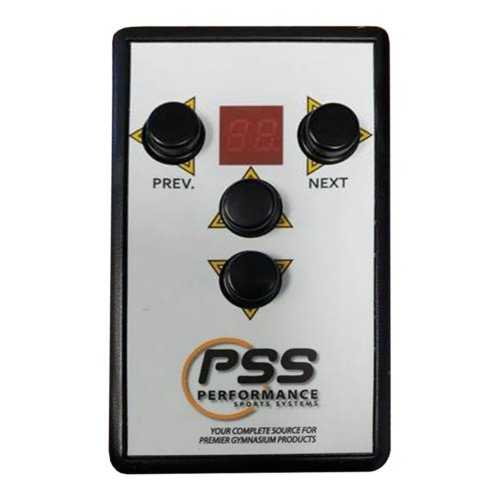
The height adjuster in this kit is available as manual (Gared Sports item #1132) or electric (Gared Sports item #1172). The manual kit includes a hand crank while the electric kit includes a key switch. The height adjuster lowers the rim from 10’ to 8’.
Backstop Mast Fit
Most single post ceiling mount backstops have a 6-5/8” diameter mast. However, some older systems have a 6” mast. This height adjuster kit will not fit a 6” mast. To determine the diameter of the mast, we recommend measuring the circumference. A 6-5/8” mast will have a circumference of roughly 20-3/4”. We recommend using the circumference because measuring the diameter at the bottom of the mast may give you an incorrect measurement. This is due to the bottom of the mast sometimes being out of round.
U-Bolts
The U-bolts fit a 6-5/8” diameter mast. The U-bolts attach to the mast at heights of 10’-0-1/4” and 13’-5-/8” above the finished floor. The mast should extend down to 9’-6” above the finished floor so that the lower U-bolt is 6” above the bottom of the mast. If you have a bent mast or fold up backstop, please ensure that nothing will interfere with attaching the height adjuster U-bolts at the above listed height measurements.
Compatible Backboards
Most competition basketball backboards will attach to the Height Adjuster for Ceiling Mount Basketball Hoop. Brands such as Gared Sports, Spalding, Draper, Porter, and Spalding have similar mounting configurations. The mounting plates at the top corners of the backboard should be 63” apart on center. The slots in the mounting plates should be 3” from the top of the backboard and 33” above the rim. The backboard should have a rim plate with holes at 4” x 5” or 5” x 5” for rim hardware.
Other Components
If you’re also upgrading other components, we probably have everything you need. The Gared Sports LXP4200 and AFRG42 competition glass backboards are both compatible with this height adjuster kit. The LXP4200 has a steel frame and is recommended when players are dunking or hanging on the rim. We also have backboard pads which fit both of these great backboards. All of our competition and professional break away rims also fit these backboards.
We’ve installed hundreds of basketball goals, maybe over a thousand. We’re not keeping count. Please let us know if you have questions about basketball goals or installation.
Additional Information
| Weight | N/A |
|---|---|
| Dimensions | N/A |
| Manual or Electric | Manual Height Adjuster Kit 1132, Electric Height Adjuster Kit 1172 |
Both the 1132 and the 1172 kits ship LTL freight. They typically ship on a pallet.
We ship within the continental United States. If you would like any gym equipment shipped elsewhere, please contact us so that we may provide a custom shipping quote.
Damage
Please list all noticeable damage on the delivery ticket before signing. Also, please take photos of damage immediately. Email us the photos so that we can work with the shipper to rectify any problems.
Shipping, Delivery & Damage Claims
Please inspect your shipment carefully at the time of delivery. Your shipment is insured, and damage or loss is rare. However, it can happen. In order to file an insurance claim, any damage or missing items must be documented at the time of delivery.
Before the shipment is unloaded, take clear photos from several angles. Then, after unloading, take additional photos in good lighting. These photos provide important documentation if a damage or loss claim becomes necessary.
Damage Claims
If the shipment, packaging, pallet, or any item appears damaged, dented, crushed, torn, or otherwise questionable, take plenty of photos before the shipment is unloaded from the truck. After unloading, take additional overall and close-up photos in better lighting.
Ask the driver to document all visible damage on the delivery paperwork, Bill of Lading (BOL), or electronic delivery app. The damage must be documented before you sign for and accept the delivery.
Your signature indicates that you accepted the shipment in its delivered condition. Therefore, do not sign the delivery paperwork or electronic delivery confirmation until you have inspected the shipment and documented any visible damage.
If there are no photos taken at the time of delivery and the damage is not documented on the delivery paperwork or app before you sign, an insurance damage claim cannot be filed. In that case, the customer will be responsible for purchasing any replacement items that are needed.
However, when you have delivery photos and the damage has been properly documented before accepting the shipment, a claim can be filed and the damaged item can be replaced at no cost to the customer.
Lost or Missing Item Claims
A shipment may appear to be in perfect condition while an item is still missing. Therefore, take photos of every shipment at the time of delivery, even when everything appears to be fine.
Take photos from several angles before the shipment is unloaded. After unloading, take additional photos in good lighting. These images help establish exactly what was present when the shipment arrived.
The shipper will have photographed the shipment before it was loaded for transportation. If an item is missing, those photographs can be compared with your delivery photos to document the loss and support an insurance claim.
If there are no photos taken at the time of delivery, an insurance claim cannot be filed for a lost or missing item. In that case, the customer will be responsible for purchasing any replacement items that are needed.
However, when your delivery photos show that an item was missing when the shipment arrived, the photographs can be compared with the shipper’s documentation to support the claim. Once the loss is properly documented, the missing item can be replaced at no cost to the customer.
Before You Sign for Your Shipment
- Inspect the shipment for visible damage or missing items.
- Photograph the shipment from several angles before unloading.
- Photograph it again after unloading in good lighting.
- Document any damage or loss on the delivery paperwork, BOL, or delivery app.
- Do not sign until any visible damage or loss has been documented.
- Keep your photos in case an insurance claim needs to be filed.
Taking a few photos at the time of delivery can make all the difference. Proper documentation protects you and provides the information required to file an insurance claim if your shipment arrives damaged or incomplete.